Point of Sale (POS)
The POS area is the heart of DiKAS — this is where you check out, place orders, and settle bills.
Table of Contents
- Daily Routine — the common thread from morning to closing time
- Checkout & Tables — direct sale and table service
- Payment Methods — cash, card, split, vouchers, credit
- Vouchers — selling and redeeming vouchers
- Customer Credit — prepaid accounts for regular customers
- Kitchen Printer & Kitchen Display — sending orders to the kitchen
- End-of-Day Report — closing the shift, Z-report
- Recording Expenses — documenting cash withdrawals
- Capture Receipts — photograph supplier invoices, AI reads them out
- Staff Switch — switching staff on the device
- Set Language — translate the interface per employee
- TSE in Daily Use — what the TSE does and what applies during an outage
POS View Overview
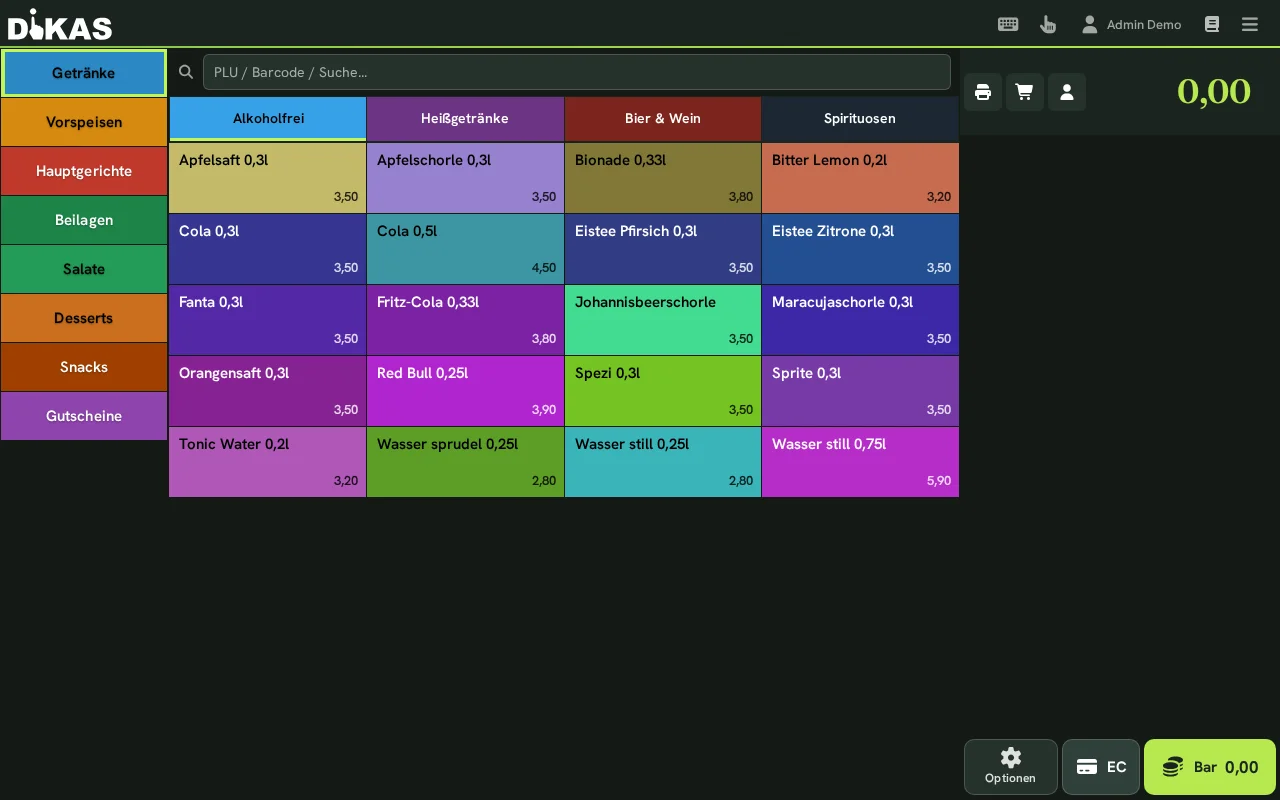
Left: Article groups as tabs, below them the articles of the selected group as tiles Right: The current receipt with order items
In table service mode, the table overview is displayed first — after tapping a table, the article view opens: