End-of-Day Report (Z-Report)
At the end of every shift or day, you perform the end-of-day report. It generates the Z-report — a complete, TSE-signed summary of all revenue, payments, expenses, vouchers, and customer credit movements. The Z-report is tax-relevant and will be requested by the tax authority during an audit.
Structure of the End-of-Day Page
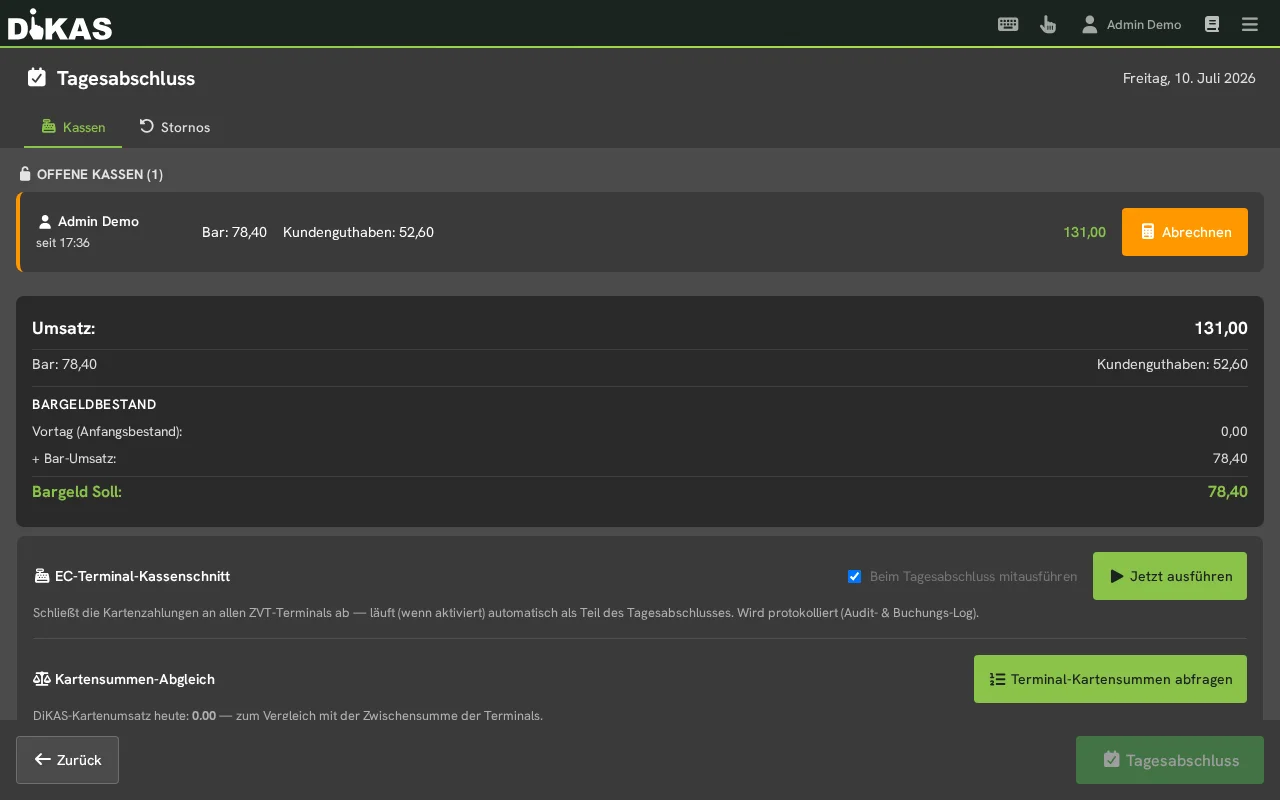
Under Menu → End-of-day report you'll see:
- At the top, the date of the business day to be closed and the "End-of-day report [date]" button
- Two tabs: Registers (all register switches/shifts of the day with revenue) and Voids (voided receipts)
- A summary: revenue by payment method and the cash balance — calculated as a running total:
  Opening balance (cash book)
+ Cash revenue for the day
− Withdrawals
+ Deposits
− Expenses (cash book)
− Cash register → bank
+ Bank → cash register
= Expected cash balance
The opening balance is therefore the closing balance of the last end-of-day report — cash carries over seamlessly from day to day, as the tax authority expects. The page shows the same figure that then appears as "Opening balance" on the Z-report. For the very first end-of-day report it is the opening balance of the first shift.
The expenses come from the cash book: all expenses, pay-ins and pay-outs of the day that are still open, no matter who recorded them — including an expense booked in the back office without a register of its own. The expected cash balance is therefore exactly the "Closing balance" on the Z-report. If an expense is recorded later for a day that is already closed, DiKAS books it with the next end-of-day report; it is then already included in that day's expected cash balance.
ℹ️ If an older day is still open, a yellow notice appears at the top. Older days must be closed first — DiKAS guides you through them in order.
What Blocks the End-of-Day Report?
| Situation | Behavior |
|---|---|
| Open register switches/shifts | Blocking — every shift must first be closed via "Settle" |
| Day already closed | Blocking — a second close of the same day is rejected |
| Open tables / NFC guests | Warning only — the close is still possible, open amounts stay open |
| Clocked-in employees | Automatically clocked out if auto clock-out is active |
In the Morning: Opening the Register
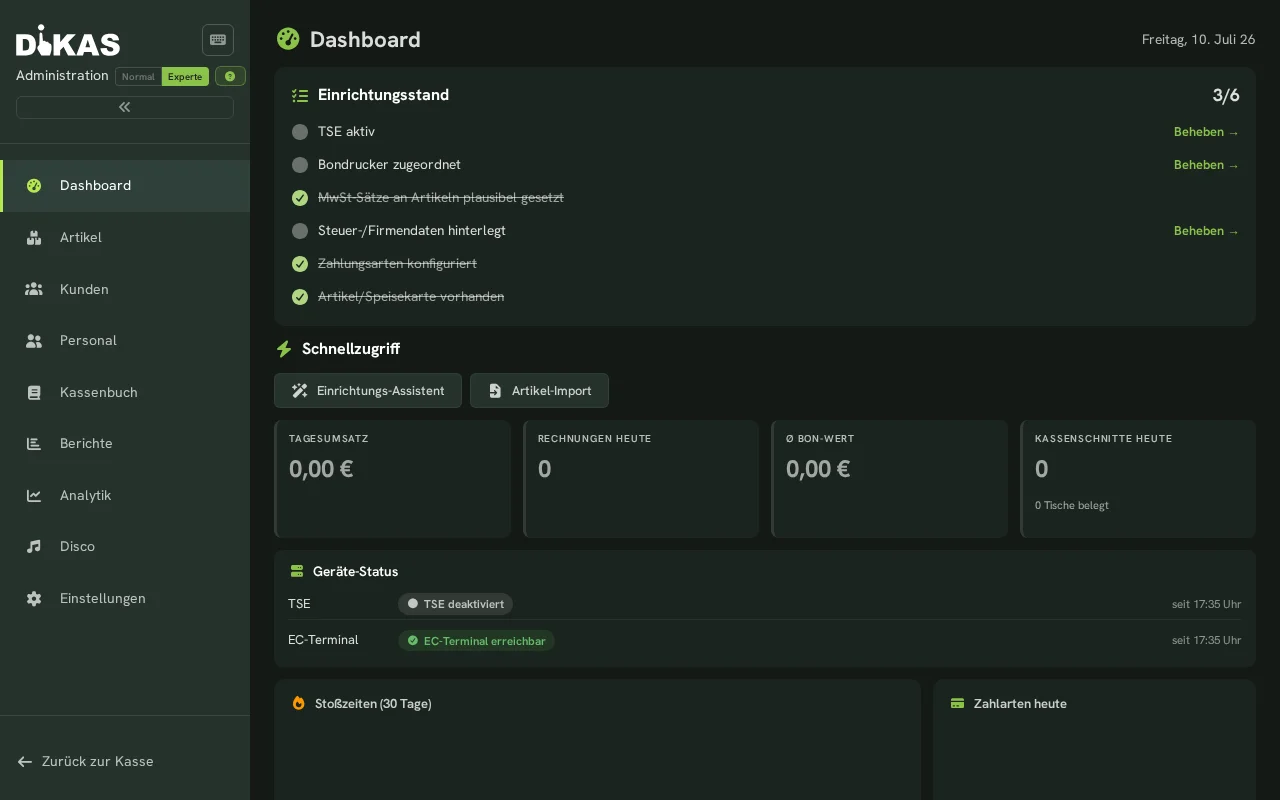
At the start of your shift, open the register with the opening balance: count the change and enter the amount on the number pad. Only then can you start taking payments — so it's clear from the very first minute how much money is in the drawer.
In the Evening: Performing the End-of-Day Report
- At the POS: Menu → End-of-day report
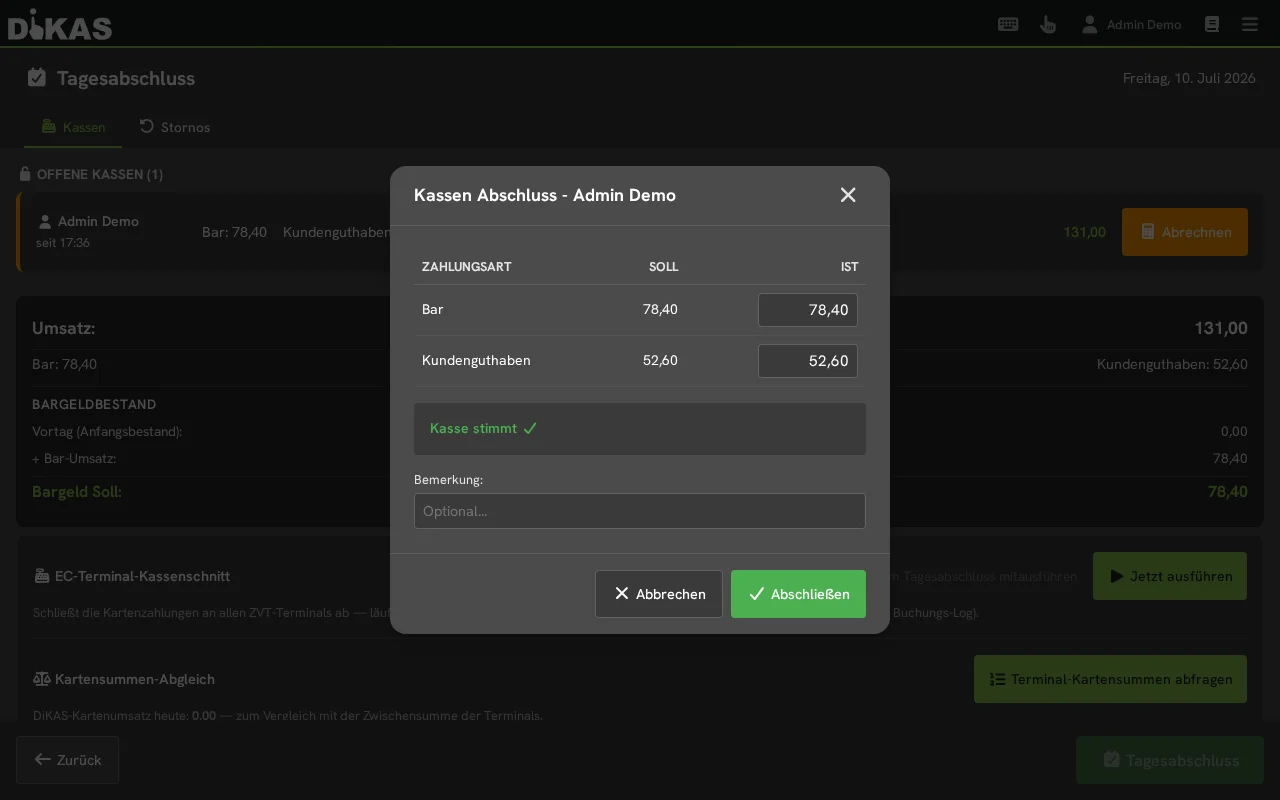
- Close every open shift via "Settle": the "Register Settlement" dialog shows the expected amount for each payment method — count and enter the actual amount (cash including the opening balance; customer credit is applied automatically). For cash, the expected amount here only deducts the expenses of the person the register belongs to. DiKAS recognises the cash line by the type of the payment method — even if it is called, for example, "Cash payment".
- DiKAS evaluates the difference immediately:
| Result | Display |
|---|---|
| Actual = Expected | "Cash register is correct ✓" |
| Actual > Expected | The surplus is shown as a tip ("Surplus: +12.50 EUR → Tip") |
| Actual < Expected | Warning "Attention: Cash balance doesn't match!" — count again |
- Once all registers are settled, tap "End-of-day report [date]"
- The Z-report is generated and TSE-signed
- Next to the button, a green "End-of-day report no. … for … has been completed." then appears. The button stays locked for this day, even if you open the page again later
Tips stay tips
If your team counts more cash in the evening than expected, in practice that's almost always tips. DiKAS therefore automatically shows the surplus as a tip — per register ("Tip: …") and in the day's total. Cash tips for employees are a pass-through item with no VAT and are correctly separated out in the export for your tax advisor.
ℹ️ Counting cash: There's no denomination entry (individual coins/notes) — you enter a total actual amount per payment method. You print the Z-report after closing, under Admin → Cash Book → End-of-Day Reports (there's no print button on the POS page).
⚠️ Important: The end-of-day report is irreversible. Once performed, no further transactions can be recorded for this business day.
Card Terminal Settlement & Card Totals Comparison
If you work with a card terminal (ZVT), you settle the terminal directly from within the end-of-day report — no need for a second trip to the device.
In the "Card Terminal Settlement" section on the end-of-day report page:
- Checkbox "Include in end-of-day report" (on by default, remembered per device): when you tap "End-of-day report [date]", DiKAS automatically runs the settlement of all ZVT terminals as part of the close. The confirmation dialog points this out.
- This is a best-effort process: an offline terminal does not block the (financial) end-of-day report — the result per terminal is displayed.
- If a terminal has no printer of its own, DiKAS prints the card terminal settlement receipt via the receipt printer (see Payment Methods → Receipt & Terminal Printer).
- "Run now": triggers the terminal settlement manually at any time.
Card Totals Comparison
With "Query terminal card totals", DiKAS retrieves the interim revenue total from each terminal and displays it next to DiKAS's card revenue for the day. This lets you spot differences between the terminal and the register before the day is closed.
💡 The actual Z-report (financial end-of-day report) is unaffected by this — the terminal settlement is the device side, the Z-report is the register side.
What Does the Z-Report Contain?
Revenue Overview
══════════════════════════════════════
  END-OF-DAY REPORT  Z-No. 47
  05.03.2026  Shift: Maria Schmidt
──────────────────────────────────────

  REVENUE
  Gross total:            1,247.80 EUR
  Net total:               1,057.85 EUR
  VAT total:                 189.95 EUR

  TAX BREAKDOWN
  19%:   Net    821.18 EUR │ VAT   155.23 EUR
   7%:   Net    299.42 EUR │ VAT    34.72 EUR
   0%:   Net     50.00 EUR │ VAT     0.00 EUR

══════════════════════════════════════
Complete Line Items in the Z-Report
| Item | Description |
|---|---|
| Gross revenue | Total revenue incl. VAT |
| Net revenue | Total revenue excl. VAT |
| VAT breakdown | Split by 19%, 7%, 0% (net + tax + gross per rate) |
| Payment methods | Cash, debit card, credit card, customer credit, voucher, house tab |
| Cash count | Opening balance + income − expenses = expected vs. actual |
| Receipt statistics | Number of receipts, first/last receipt no., average amount |
| Voids | Number and amount of voided receipts |
| Discounts | Total amount of discounts granted |
| Tips | Sum of all tips |
| Voucher statistics | Sold (count/amount), redeemed (count/amount), outstanding balance |
| Customer credit | Top-ups, usage, bonus top-ups, bonus usage, payouts |
| Customer points | Points earned, points redeemed, discount value |
| Expenses | Split by cash expense, POS→Bank, Bank→POS, bank transfer |
| Deposit | Deposit collected and deposit returned |
| Waiter settlement | Revenue and receipt count per employee |
| Article groups | Revenue per article group |
| Article list | All sold articles (A–Z) with quantity and amount |
| Workstations | Revenue per POS/workstation |
Payment Method Breakdown
  PAYMENT METHODS
  Cash:                        687.30 EUR
  Debit card:                  412.50 EUR
  Credit card:                  98.00 EUR
  Customer credit:               25.00 EUR
  Voucher:                       25.00 EUR
Customer Credit Movements
  CUSTOMER CREDIT
  Top-ups:                     200.00 EUR
  Usage:                       -75.00 EUR
  Bonus top-ups:                20.00 EUR
  Bonus usage:                 -12.00 EUR
  Payouts:                     -30.00 EUR
Voucher Statistics
Expenses Overview
  EXPENSES
  Cash expenses:                57.00 EUR
  Transfers:                    30.00 EUR
  Income:                       15.00 EUR
  Bank transfers:              120.00 EUR  (no cash register effect)
💰 Cash Count (Counting Money)
Before the end-of-day report, you should count the contents of the cash register:
- Count the cash in the register
- Enter the counted balance
- DiKAS compares it with the expected balance
- The difference is displayed
Cash Formula
Expected balance = Opening balance (= closing balance of the previous day)
                 + Cash income
                 + Deposits/income
                 − Cash expenses
                 − Withdrawals/transfers
| Difference | Meaning |
|---|---|
| 0.00 EUR | Cash register is correct |
| + Amount | More money than expected (cash surplus) |
| − Amount | Less money than expected (cash shortage) |
ℹ️ Note: Small differences (under 1 EUR) are normal and result from rounding during change. The difference is documented in the Z-report.
What Happens During the End-of-Day Report?
The end-of-day report internally performs the following steps:
| Step | Description |
|---|---|
| 1 | Validation: check open register switches, prevent duplicate closes |
| 2 | Load receipts: collect all receipts for the business day |
| 3 | Calculate revenue: gross, net, VAT, payment methods |
| 4 | Break down tax: grouping by tax rate |
| 5 | Waiter settlement: revenue per employee |
| 6 | Article groups: revenue per article group |
| 7 | Customer credit: top-ups, usage, payouts |
| 8 | Customer points: points earned and redeemed |
| 9 | Vouchers: sold, redeemed, outstanding balance |
| 10 | Deposit: collected and returned |
| 11 | Close expenses: open expenses are assigned to the end-of-day report |
| 12 | TSE signing: the Z-report is digitally signed (mandatory) |
| 13 | Draught system reset: systems with "reset on end-of-day" are reset |
| 14 | Auto clock-out: employees still clocked in are automatically clocked out (if enabled) |
Business Day
The business day in DiKAS runs from 06:00 to 05:59:59 the following day. This way, night shifts (e.g. a club open until 04:00) are correctly assigned to the right day.
🔐 TSE Signing
The end-of-day report is automatically TSE-signed with the ProcessType "AVKassenschnitt" (register cut). The TSE data is stored in the Z-report:
| TSE Field | Description |
|---|---|
| Transaction number | Unique TSE transaction ID |
| Signature | Digital signature from the TSE |
| Signature counter | Sequential counter |
| Start/end time | Timestamp of the signing |
| Serial number | TSE module serial number |
TSE signing is legally required (KassenSichV, the German Cash Register Security Ordinance) and happens fully automatically in the background.
Automatic End-of-Day Report
You can configure an automatic end-of-day report:
- Admin → Settings → Business
- Turn on the "Automatic end-of-day report active" toggle
- Select the time that appears (e.g. 3:00 a.m.)
The report is then performed automatically every day at the chosen time — useful for businesses that occasionally forget to close. Open register switches are automatically closed with a difference of 0 in this case.
ℹ️ There's an explicit on/off toggle ("Automatic end-of-day report active"). When it's off, no automatic close is performed and the time selector is hidden. When it's on, you choose the desired time.
Auto Clock-Out
If the option "Automatically clock out on end-of-day report" is enabled under Admin → Settings → Business:
- During the end-of-day report, all employees still clocked in are checked
- Employees on break are first taken off break (BreakEnd)
- Then an automatic clock-out entry is recorded
- Note: "Automatically clocked out (end-of-day report)"
- The names of the clocked-out employees are listed in the Z-report
Coin Levels (with a Cash Machine)
Businesses with a cash machine (cash recycler, e.g. VNE or Cashmatic) also find the "Coin levels" entry in the POS menu: it shows the device's current fill levels — handy before closing, to see whether change needs to be refilled.
Viewing Past End-of-Day Reports
You'll find all past end-of-day reports under:
Admin → Cash Book → End-of-Day Reports
| Column | Description |
|---|---|
| Z-No. | Sequential number |
| Date | Business day |
| Gross | Total revenue |
| Cash | Cash income |
| Card | Card income |
| Receipts | Number of receipts |
| Difference | Cash surplus/shortage |
| Closed by | Employee |
Click on an end-of-day report to view the complete Z-report.
Practical Example: Restaurant Close
Situation: Restaurant "Zur Linde", shift ends at 22:30.
- Check open tables: all tables are paid ✓
- Open the end-of-day report: Menu → End-of-day report
- Check the preview:
- 1 warning: "Lisa Müller is still clocked in" → will be clocked out automatically
- No blocking issues
- Cash count: count the cash → enter 742.30 EUR → difference: 0.00 EUR ✓
- Perform the close: the Z-report is generated, TSE-signed
Z-Report No. 47 — 05.03.2026
  Gross:                1,247.80 EUR
  Cash:                   687.30 EUR  (55.1%)
  Card:                   510.50 EUR  (40.9%)
  Voucher:                 50.00 EUR  (4.0%)
  Receipts:                     34
  Voids:                         2  (15.90 EUR)
  Vouchers sold:                 3  (150.00 EUR)
  Expenses:                57.00 EUR
  Difference:               0.00 EUR
Frequently Asked Questions
Can I undo an end-of-day report? No. The end-of-day report is irreversible and TSE-signed. If there's a mistake, you can make a correction entry on the following day.
What happens if I forget the end-of-day report? You can still perform it the next day — it then refers to the business day it belongs to, not to the current day. Alternatively, enable the automatic end-of-day report.
Do all tables need to be closed? No. Open tables are a warning, not an error. You can still perform the end-of-day report — the open tables will then be settled in the next end-of-day report.
What does "Deferred expenses" mean? Expenses with the payment method "Bank transfer" (AccountMode 4) have no cash register effect — they are shown separately in the Z-report as "Deferred expenses" and do not affect the cash count.
How often should an end-of-day report be performed? At least once a day. In shift operations, a close can also be performed per shift.
Next Step
→ Recording Expenses — Documenting cash withdrawals and expenses